Can AI Make You World Class at Something You Know Nothing About?
How I built a vision model that outperformed everything while not understanding how a single line of the code worked.

The internet is full of impressive AI demos, but the real question is:
I started without the skills this problem needed. I had never built a vision model, and I did not know how to make code fast on a CPU or GPU.
Using AI (Codex), I built a grouping algorithm at a world-class level.
These are the techniques that got me there.
The problem came from a public coding challenge.
Understanding the Problem
A real estate photographer shoots each camera angle several times through the use of a macro to capture exposures from very dark to very bright.
Those frames are a bracket set, and they get merged into one HDR photo.
What Goes Together
Frames belong together when the photographer shot them as one bracket set from one camera angle.
Computational Constraints
The Hard Cases
Getting the general grouping correct is relatively easy, the hard part is then separating groups that are nearly identical. This is done so that when images are merged / processed by AI, it does not induce weird artifacts.
State Change
Slight Angle Change
Same Floor Plan, Cosmetic Difference
Building the Solution
Starting From Zero
I did not know how classic computer vision worked, so the first thing I did was ask the AI.
The work turned out bigger than I expected, and I ran out of time before the challenge closed.
My final attempt achieved a ~99.4% accuracy across the cleaned full 260K image dataset
Building a Dataset I Couldn't Overfit
From research in college, I knew to worry about overtraining, but I did not know how to build the splits that prevent it.
| Shards | Job | Rule in the goals |
|---|---|---|
| 10K and 20K | Smoke tests and pruning | Sweep these cheap cached shards first |
| 40K | Main optimization loop | Primary comparison |
| 80K | Scale confirmation | Required before any promotion |
| Stress and control sets | Hard cases, replayed failures, neutral samples | Can block a promotion, never make one |
Designing the Pipeline
I asked the AI how to structure the grouping, and it laid out a chain of phases that each hand one table to the next.
Each phase does one job, and none of them uses a neural net.
Optimizing the Accuracy Algorithm
The algorithm had to group the photos correctly, and it had to run fast enough for the challenge limits.
What to Optimize at Each Phase
Obviously accuracy is the key metric to optimize, but since my algorithm has multiple independent phases, I did not know what metrics to optimize for each phase, so I asked AI.
A loose goal let the agents stop early.
Phase 2: Candidate pairs
// Objective 20 goal: Phase 2 candidate pairs
// Suite: objective20_thorough, 95 shards
{
  // truth groups the candidates leave in 2+ pieces, must be 0
  "phase02_fragmented_truth_groups": {
    "baseline": 4,
    "bound": "== 0 on every shard and in aggregate"
  },
  // candidate rows / images, lower is cheaper
  "phase02_candidate_rows_per_image": {
    "baseline": 14.93,
    "bound": "below roughly 12.0"
  }
}
Phase 3: Edge scores
// Objective 21 goal: Phase 3 edge scores
// Scorecard: core stratified40 + stratified80
{
  // pairs a group needs to stay whole, left unaccepted, lower
  "missed_true_bridge_edges": {
    "baseline": 442,
    "bound": "<= 110"
  },
  // pairs from different truth groups accepted, lower
  "cross_truth_above_threshold": {
    "baseline": 3219,
    "bound": "<= 2500"
  }
}
Phase 4-7: Grouping
// Objective 4 goal: Phase 4 initial grouping
// Scorecard: cached stratified40+80 core, 176,260 groups
{
  // exact groups / all truth groups, higher
  "score": { "baseline": 0.9788, "bound": ">= 0.9925" },
  // truth groups reproduced file for file, higher
  "exact": { "baseline": 172528, "bound": ">= 174939" },
  // predicted groups holding another group's files, lower
  "false_merges": { "baseline": 2438, "bound": "<= 2438" },
  // truth groups split across predicted groups, lower
  "false_splits": { "baseline": 1450, "bound": "< 1450" },
  // groups both split and merged, lower
  "mixed": { "baseline": 156, "bound": "<= 156" },
  // lowest score on any one shard, higher
  "worst_core_shard": { "baseline": 0.9742, "bound": ">= 0.99" }
}
Optimizing the Speed of the Algorithm
The challenge gave the whole run 60 minutes on 16 vCPUs with no GPU, so speed was part of the algorithm.
The Process
Once a phase worked correctly, I did not know how to make it fast, so I split the job between two agents.
Using this approach, I was able to cut the runtime by 80-90% depending on the size of the dataset
Optimizing the Experiments
When stepping into the world of AI assisted research, the real constraint is the number of experiments you can run in a given time.
I needed to find ways to greatly speed the rate of experimentation while be constrained to online the compute on my single machine I had at the time.
Caching Every Phase
Phases 1 to 3 cached their output, keyed by the settings that produced it.
Moving Sweeps to the GPU
I don't know how to write GPU optimized code in general, let alone having it work on MLX... but agents do
The agents ported Phases 2 and 3 to MLX, Apple's machine-learning array framework, so sweeps could run on the one Apple GPU I had.
run_, 1,518 lines.main()Entry point. One run is one full proxy sweepload_mlx(require_mlx=True)Imports mlx.core, requires Metal, makes the GPU the defaultload_feature_arrays(feature_table)133 cached columns for 6,493,245 image-pair rowsload_configs(config_matrix, ...)50,761 rule configs become float32 threshold columnscpu_baseline_by_shard(features, ...)Baseline counts per shard, used later for deltasrun_full_sweep(mx, features, ...)Configs outer loop, rows inner loop, sums counts per configevaluate_chunk(mx, features, configs, ...)Called 650 times: 50 config chunks x 13 row chunksmake_feature_getters(mx, features, r0, r1)Each feature slice becomes a column (rows x 1) on the GPUmake_config_getters(mx, configs, c0, c1)Each threshold becomes a row (1 x configs), so they broadcastaccepted = (...) & ~global_brakeThe decision for every pair under every config at oncemx.matmul(shard_one_hot.T, mask)Per-shard counts as one matrix multiplymx.eval(*aggregate_outputs.values(), ...)Runs the lazy MLX graph on the GPU and returns countsresult_rows(config_rows, ...)Missed bridges, cross rows, worst shard, rank score per configpareto_rows(results)Keeps configs nothing beats on both missed and crosswrite_json(..., benchmark_summary)Records device, shape, elapsed time, throughput, memoryCleaning the Dataset
During the challenge, I only worked on the algorithm. I was disappointed with my result, so I kept going afterward and looked at the errors the model was making.
The errors pointed back at the data. The dataset was badly broken, so I had to fix it before the system could get any better.
I used AI for the scale and kept myself in the loop for the judgment calls.
The cleaning ran in five stages, and the last two repeated until the dataset was clean.
Tagging Every Image
I started by having Gemini 3.1 Flash-Lite label every image, with BAML defining the label schema, through the gemini batch API
1enum IndoorOutdoorTag {2 INDOOR3 OUTDOOR4 UNKNOWN5}6 7enum CameraViewTag {8 GROUND_LEVEL @description("Normal human-height interior or exterior property photo.")9 AERIAL_DRONE @description("Drone or clearly aerial property view.")10 // ... ELEVATED_VIEW, DETAIL_CLOSEUP, LOW_INFORMATION, OTHER, UNKNOWN11}12 13enum AreaTypeTag {14 KITCHEN @description("Kitchen or kitchenette.")15 BATHROOM @description("Bathroom, washroom, shower, tub, vanity, or toilet area.")16 // ... 31 more, from BEDROOM and OPEN_PLAN to WAREHOUSE, POOL, and FACADE17 UNKNOWN @description("Area cannot be determined from the image.")18}19 20type QualityFlag = "blurred" | "dark" | "overexposed" | "underexposed" | "rotated_or_orientation_issue" | "partial_or_occluded"21 22class ImageClassification {23 indoor_outdoor IndoorOutdoorTag24 camera_view CameraViewTag25 area_type AreaTypeTag26 secondary_flags SecondaryFlagTag[]27 quality_flags QualityFlag[]28 tag_confidence "high" | "medium" | "low"29 short_reason string30 // ... each field also carries an @description in the source31}32 33function ClassifyDatasetImage(img: image) -> ImageClassification {34 client Gemini31FlashLiteLow35 prompt #"36 {{ DatasetImageClassificationPrompt(img) }}37 "#38}39template_string DatasetImageClassificationPrompt(img: image) #"40 // ...41 - Choose camera_view by how the image is shot, not by what area is shown.42 - Use quality flags only for visual defects, not for normal real-estate lighting or ordinary HDR variation.43 // ...44 {{ ctx.output_format }}45"#Lock the label schema before the full run.
Look at the Data
Using the Tags to Find Problems
The tags turned 266,376 images into something I could filter.
Remove Low Information and Duplicates
Some images could never be grouped right, so the easiest fix was to remove them.
Fixing Broken Groups and Duplicates
The rest of the problems were whole groups, not single images.
Review Until It Was Clean
I had Codex build a review studio so I could make each call fast. The UI is clunky, and the video below does most of the explaining.
Each batch of calls went back to the agent for the next round of corrections.
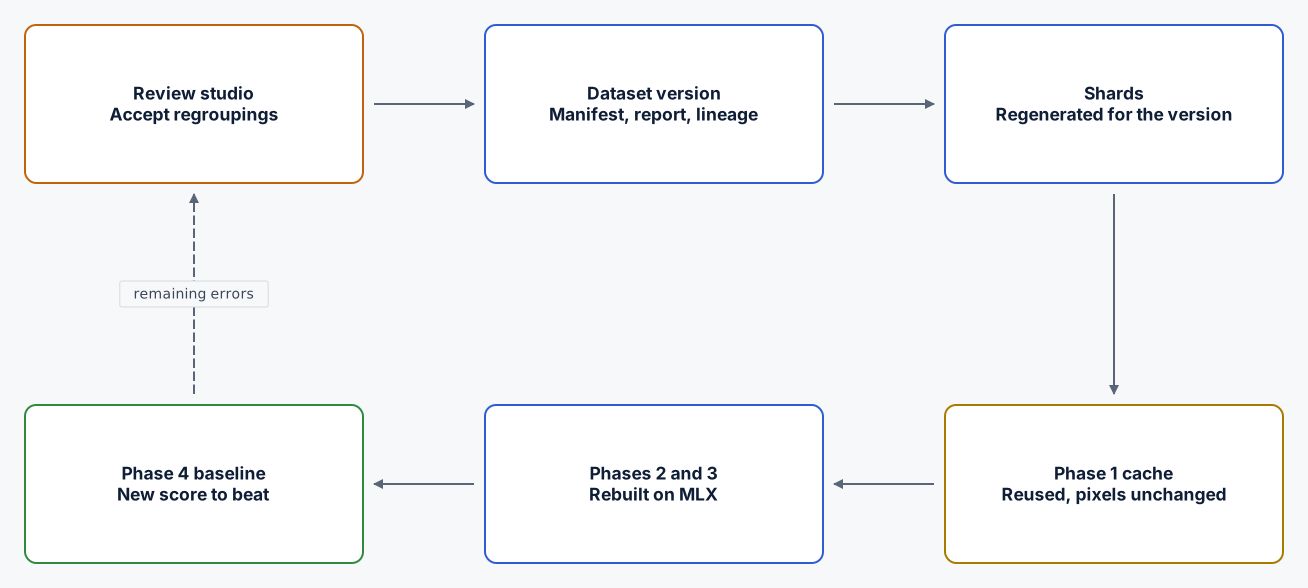
Each accepted round became a new dataset version, and the baseline had to be rebuilt before the next experiment meant anything.
Did AI Make Me World Class?
I went in asking whether AI could make me world class at something I did not know how to do.
Yes, it did.
I did not know how the algorithm worked or how to do this at all. I was still able to run these systems and churn through things at a level better than people who were world class at this.
The Results:
I started knowing almost nothing about vision models and finished with a SOTA algorithm.
Wild times we live in.
Related Posts
For the goal, context, workspace, and current-state files that kept these runs on track, read Objectives: A Lightweight Way to Keep Agents on Track for Long-Running Tasks.